
Streamline Your Network Management with WinBox
WinBox, developed by MikroTik, is a free Windows-based utility for managing RouterOS devices. Designed for network administrators and system integrators, it offers a clear graphical interface that simplifies complex network tasks. Although it runs natively on Windows, it also operates on macOS and Linux through Wine. Its intuitive layout makes it accessible to both newcomers and seasoned professionals who need fast, direct access to their MikroTik routers.
Top Recommended Alternative

For all skill levels
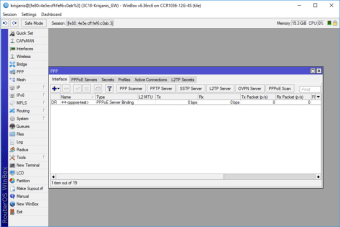
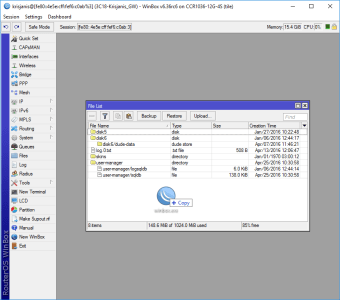
WinBox features a user-friendly GUI that demystifies many aspects of RouterOS configuration. Its organized layout and drag-and-drop functionality streamline file transfers and simplify navigation between tools. Serving as a graphical alternative to many command-line tasks, it reduces the learning curve for beginners while retaining the flexibility experts need. WinBox supports connections via IP or MAC address, allowing administrators to manage devices locally or remotely with ease.
Comprehensive network control
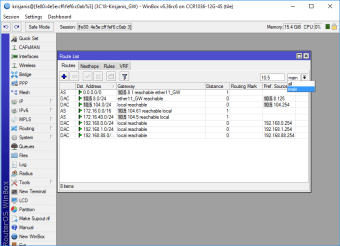
With a broad set of management tools, WinBox enables users to configure nearly every RouterOS function. Administrators can set up firewalls, VLANs, and VPNs, adjust routing tables, manage wireless interfaces, and monitor real-time traffic and performance charts. Its responsive interface supports quick configuration changes without rebooting routers, allowing proactive management and troubleshooting across complex networks.
Secure and reliable management
Security in WinBox relies on encrypted communication and user authentication for safe device access. Each session is protected by encryption (AES-based) and secure credential handling, minimizing exposure to unauthorized access. However, as with all network tools, keeping both WinBox and RouterOS updated is vital to avoid vulnerabilities discovered in older versions. The lightweight client design ensures stable performance even during extensive configurations, though very large setups can slow responsiveness slightly.
Modern RouterOS integration and ongoing improvements
Recent RouterOS 7 updates have further improved the overall WinBox management experience, especially for enterprise and ISP-level deployments. Newer releases introduced enhanced support for high-speed Ethernet interfaces, improved monitoring statistics, and more stable handling of advanced networking features such as EVPN, BGP, and VLAN filtering. MikroTik has also continued refining WinBox compatibility with RouterOS 7 builds, ensuring smoother device management and better responsiveness when handling modern networking hardware.
Faster workflow and smarter administration
One of WinBox’s biggest advantages remains how quickly administrators can navigate between complex RouterOS settings without relying entirely on command-line syntax. Newer updates have improved multi-window management, allowing network engineers to monitor interfaces, logs, firewall rules, and routing tables simultaneously with fewer slowdowns. Additional enhancements to file handling and device menus also streamline tasks like firmware updates, backup exports, and troubleshooting sessions, helping administrators manage large deployments more efficiently.
Improved stability for enterprise networking
MikroTik’s recent development cycle has focused heavily on stability improvements, particularly for business and carrier-grade environments. RouterOS updates tied to WinBox now include refinements for PPPoE servers, DHCPv6 reliability, SNMP monitoring, and bridge performance in VLAN-heavy infrastructures. Community feedback from network administrators highlights that newer RouterOS 7 builds are increasingly stable for production environments, especially for users handling BGP routing, ISP services, and multi-site VPN deployments.
Enhanced hardware and future network support
WinBox continues evolving alongside MikroTik’s expanding hardware ecosystem. Recent beta and stable releases added compatibility improvements for WiFi 7 technologies, LTE eSIM management, and advanced switch configurations. MikroTik has also introduced support for newer network drivers and improved container management tools, making WinBox more capable in hybrid cloud and virtualization setups. These updates show how the platform is adapting to modern networking demands while maintaining the lightweight efficiency longtime MikroTik users appreciate.
For growing networks
WinBox remains one of the most dependable utilities for managing MikroTik devices thanks to its combination of speed, deep RouterOS integration, and real-time administrative control. Its ongoing compatibility updates and expanding support for enterprise networking technologies help keep it relevant for both small office deployments and large-scale infrastructures. While advanced RouterOS concepts may still require experience to master, WinBox continues to simplify complex networking tasks through its efficient interface and constantly improving feature set.
A valuable tool
WinBox remains an essential part of the MikroTik ecosystem. Its intuitive interface, real-time monitoring, and comprehensive toolkit make it indispensable for professionals managing complex networks. While beginners may find advanced features challenging, MikroTik’s documentation and active community provide helpful support. Despite minor limitations in interface customization and learning curve, WinBox continues to deliver reliable, fast access to RouterOS devices worldwide.